
For anyone with a place to be found
Get them to the door — and know who walked in
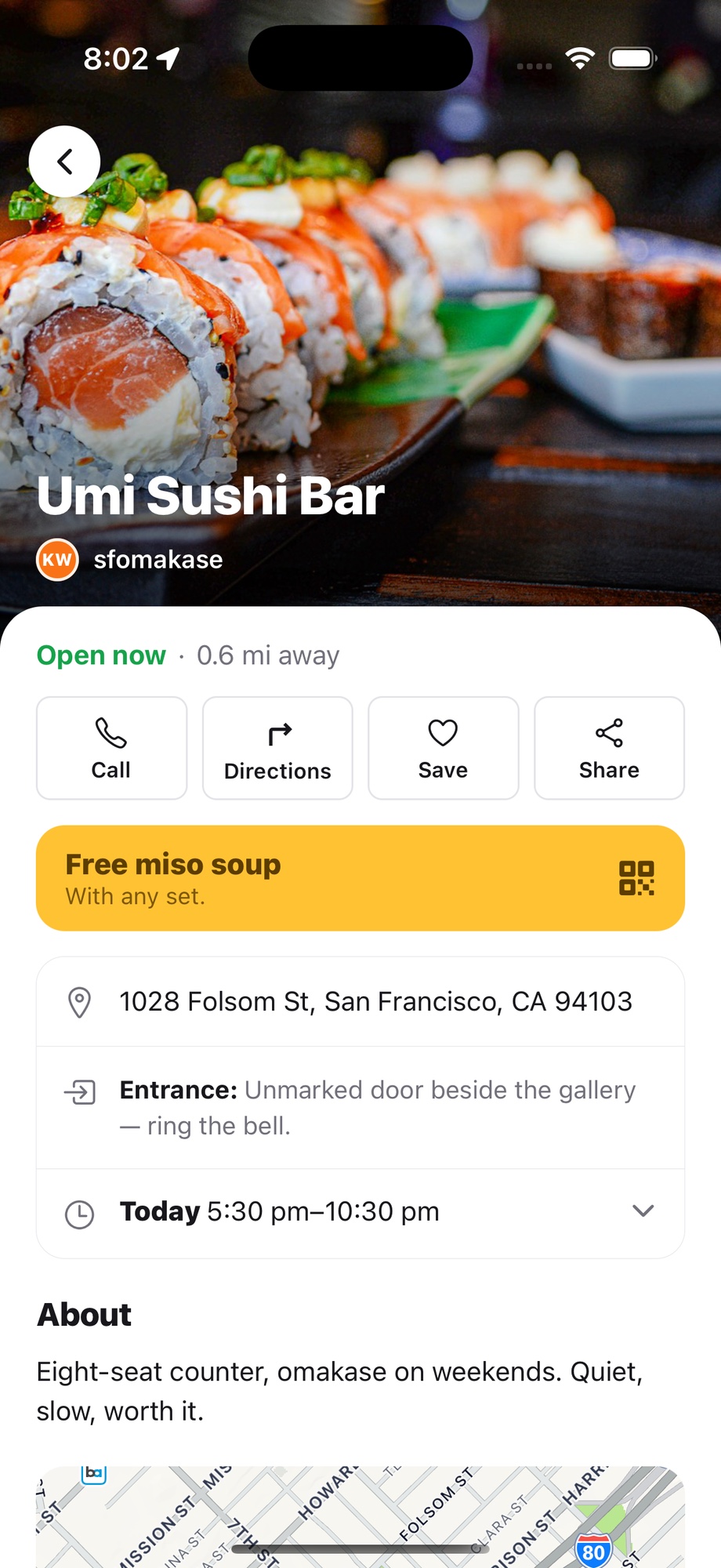
A shop, an event, a new building, an open house — you pick the photos, the offer and the way in: which gate, which floor, where to park. Not the same maps listing everyone else sends. And when someone actually turns up, you know who sent them.
- Restaurants & shops
- Events
- Open houses
- New developments
- Offices & venues
- Creators
Walked in today
- 12Umi Sushi Barvia @sfomakase
- 84Maya & Sam's weddingvia the invite
- 9Open house, 412 Oak Stvia listing ad
Not just businesses and creators
Anywhere people get lost in the last few steps. Customise the page they land on, and see who made it to the door.
Restaurants, shops and studios
Your photos, tonight's offer, which entrance, which floor.
Walk-ins, credited to the creator who sent them.
Creators
Your own link to every place you recommend.
Proof of who you actually sent, under your handle.
Events
Weddings, launches, pop-ups, meetups — the hall, the side gate, the parking, the time.
Who arrived, and which invite or post brought them.
New properties and open houses
The model unit, the sales office, the visitor parking, the photos you want them to see first.
Which listing, agent or ad sent each visitor.
Offices, clinics and venues
Which building, which lobby, which lift, where guests check in.
Who made it, without a sign-in sheet.
For everyone — free, no account
Create a custom link to your place
Your home, your party, your open house. Find it, check the pin, and your link is ready — the gate, the building, the floor, the unit number, behind one short link.
Want to drop the pin yourself? Use the map
A link you control, not the listing everyone else sends
Google Maps and Apple Maps are generic by design — every place gets the same page, and none of it is yours to control. Not the photos, not what is missing, and never your offer.
What everybody already measures
Views. Taps. Clicks.
Every platform reports these. None of them means anybody left the house.
What you are paying for
Someone who turned up.
The app spots them arriving, and at the counter your staff put in a 4-digit code to accept the offer. Two ways to catch it, and neither one can be faked from home.
For businesses working with creators
Everything a collaboration needs, and nothing it doesn't
You can see who sent them
Every creator gets their own link. Everyone who opens it, gets directions, or walks in is counted as theirs — under the handle they already post with.
Two ways to know they turned up
The app spots a phone arriving at your place and counts it, with nobody lifting a finger. At the counter, your staff put in a 4-digit code to accept the offer — so the person claiming the visit is never the one confirming it.
A budget for each creator
Decide what the deal is worth, pause it, or end it. The creator picks their own offer within it.
Every visit has a receipt
Each one is listed with the time it happened, kept here rather than by the business or the creator. If anyone doubts the total, you look it up instead of arguing.
Five steps, and the last two are the ones nobody else has
Every platform can tell you about the first three. Turning up is the part none of them can see, so there are two ways to catch it — and a visit counts on whichever one happens.
01
A creator shares the link
In the reel, in the bio, in the story — tagged with their handle, so everything after this is credited to them.
02
Your page opens, not a listing
Your photos in your order, your hours, which gate, which floor, which unit. On the web, or in the tinymap app.
03
Your offer is already there
A free coffee, a discount, a fixed price. Nothing to remember and no code to type in.
04
Their phone marks the arrival
When their phone gets to your place, the app counts the visit by itself. Nobody taps anything. Only works if they have the app.
05
Or your staff confirm it
At your counter, the customer shows the offer on their phone. Your staff accept it with a 4-digit staff code — and that counts the visit.
Steps four and five count less than really happened, never more. The app only spots people who have it, and plenty who walk in never ask for the offer. So the number you see is one you can say out loud and defend — not the biggest one we could show you.
Start with one place
A shop, a venue, an event, a new building. Sign in, set up the page, and hand out a link for each place you share it. The first walk-in tells you more than a month of views.